Hadoop Installation Pre-Requisites
Below are the pre-requisites for installing Hadoop:
- Linux
- JDK 1.8 installed
- IPV6 disabled
- Selinux disabled
JDK
JDK 8 is needed on the Linux Machine. Below are the steps for installing oracle java:
- Install java 8 as the root user
- http://www.oracle.com/technetwork/java/javase/downloads/jdk8-downloads-2133151.html
- wget –no-cookies –no-check-certificate –header “Cookie: gpw_e24=http%3A%2F%2Fwww.oracle.com%2F; oraclelicense=accept-securebackup-cookie” “https://download.oracle.com/otn-pub/java/jdk/8u201-b09/42970487e3af4f5aa5bca3f542482c60/jdk-8u201-linux-x64.rpm”
- yum localinstall jdk-8u201-linux-x64.rpm
Ensure that java 8 is installed properly:
- java -version

Set the below in .bash_profile
- export JAVA_HOME=/usr/java/jdk1.8.0_201-amd64/
Disable IPV6
- Edit file /etc/sysctl.conf - vi /etc/sysctl.conf
Add the following lines:
- net.ipv6.conf.all.disable_ipv6 = 1
- net.ipv6.conf.default.disable_ipv6 = 1
Execute the following command to reflect the changes.
- sysctl -p
Selinux
Just ensure that selinux should be disabled so that it cant impact Hadoop performance.
- sudo setenforce 0
To disable it permanently
- edit /etc/selinux/config
SELINUX=disabled
- reboot
Steps Involved in Installing Hadoop
- Install bind-utils : Otherwise Cloudera Manager gives host not found
- yum install bind-utils
- Install Cloudera Manager
- cd
- wget https://archive.cloudera.com/cm5/installer/latest/cloudera-manager-installer.bin
- chmod u+x cloudera-manager-installer.bin
- ./cloudera-manager-installer.bin
- Accept Licenses
- Open ports on Linux Machine
- Open the ports 7180 and 8080
After Installation of Cloudera Manager
go to http://host-ip:7180/
- Log in with admin/admin
- Select Cloudera Express Installation
- For host, give the hostname IP (private IP)
- Install using Parcels
- Include the Kafka parcels
- User : sparkflows ( As per as updated on machine while creating Linux Machine)
- Supply the private key
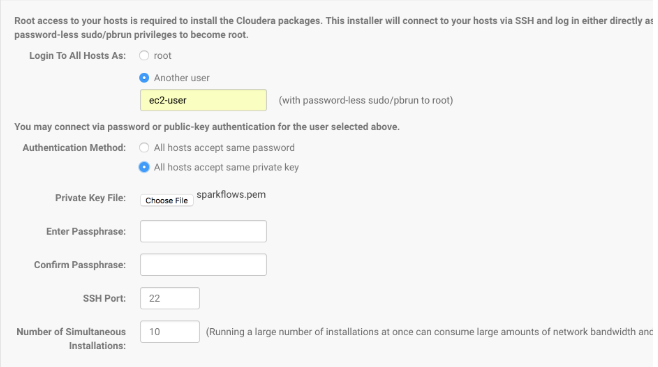
- Install Core with Spark
- Update default Configurations in it.
Add proxy user in HDFS
- Add sparkflows as proxy user in HDFS
- https://www.sparkflows.io/connecting-sparkflows-with-spark-cl
- Cluster-wide Advanced Configuration Snippet (Safety Valve) for core-site.xml
- hadoop.proxyuser.sparkflows.hosts
- hadoop.proxyuser.sparkflows.groups
- Restart Cluster services
Create HDFS directory
Create HDFS directory for sparkflows user (we can create as per as requirements)
- sudo su
- su hdfs
- hadoop fs -mkdir /user/sparkflows
- hadoop fs -chown sparkflows:sparkflows /user/sparkflows
Install Spark2
spark2 is installed using CSD or Parcels
- https://www.cloudera.com/documentation/spark2/latest/topics/spark2_installing.html
- cd /opt/cloudera/csd
- sudo su
- wget http://archive.cloudera.com/spark2/csd/SPARK2_ON_YARN-2.1.0.cloudera2.jar
- chown cloudera-scm:cloudera-scm SPARK2_ON_YARN-2.1.0.cloudera2.jar
- chmod 644 SPARK2_ON_YARN-2.1.0.cloudera2.jar
- service cloudera-scm-server restart
Login Again into Cloudera Manager
- In Cloudera Manager:
- Go to Hosts/Parcels
- Download Spark2
- Distribute Spark2
- Activate Spark2
- Add Spark2 service in Cloudera Manager
- Go to Cluster/Add Service
- Add Spark2 Service
- For dependency select one with HIVE etc.
- Select the host
In YARN increase Container memory to 8GB
- yarn.scheduler.maximum-allocation-mb
- yarn.nodemanager.resource.memory-mb
AFTER INSTALLATION GET CDH TO USE JAVA 8
- In Spark configuration in Cloudera Manager set the below for spark-defaults.conf
- spark.executorEnv.JAVA_HOME=/usr/java/jdk1.8.0_201-amd64/
- then redeploy the client configurations
- Restart the cluster service
Install Sparkflows
- ssh to the machine
- wget https://s3.amazonaws.com/sparkflows-release/fire/rel-x.y.z/2/fire-x.y.z.tgz
- tar xvf fire-x.y.z.tgz
- cd fire-x.y.z
- ./create-h2-db.sh
- ./run-fire.sh start
- ./run-fire-server.sh start
Upload the Fire Insights example data directory onto HDFS
- As sparkflows user
- cd fire-x.y.z
- hadoop fs -put data
Log into Fire Insights
- http://host-ip:8080/#/dashboard
- Log in with admin/admin
- Create user sparkflows in Sparkflows. Give it admin rights. Add to group default, save it.
- Again Login with sparkflows user.
- Go to Configurations under administration and click on infer hadoop cluster config and save it.
- open spark and update spark2-submit under “spark.spark-submit” and save it.
- Create a workflow and execute it.